Unix screen-shots thread! - Desktop Customization & Workflow

Users browsing this thread: 5 Guest(s)
|
|||


|
|||
(01-04-2022, 02:57 PM)Shrek Wrote: What's old is what's new again. I'm working on a Motif based desktop. SHREK... Any update on the progress on this? I want this desktop! As for my current setup, my primary system is now a desktop PC with a 16:9 1440p monitor.. so, gone are the days of tiling window managers! I now have a dedicated mouse with a large mouse pad... I decided to give LQXt/Openbox a try. I still have lots of window snapping key bind's in my obconf so I'm not that far removed from the tiling life... but my goodness it is nice to finally have space to freely float some terminals and enjoy drop shadows again! 
|
|||


|
|||
|
This is my take at a 4Dwm inspired Motif desktop, using Emwm. It's not as advanced as Shrek's, considering I just applied some X11/Xm resource tweaking, but it works nicely.
Dotfiles available at https://sehnsucht.multics.org/dots/mwm/ 
|
|||


|
|||
|
Hello, it’s been a while.
Here’s another attempt at making a “bright” color scheme, that I can use on my laptop when I’m outdoors:  Just on the laptop, though. I want a comfortable dark scheme on my normal workstation. As usual, katriawm, bevelbar, infofeld2. |
|||


|
|||


|
|||
(06-05-2025, 04:10 AM)venam Wrote: The only thing that's bugging me is the bold inverted colors in ncmpcpp, it scrambles it too much for my taste.My problem with bright color schemes is this: They lack contrast, especially when colors are involved. It gets better if the font is more bold. One obvious idea is to use non-bitmap fonts, but I cannot stand them at all. As a workaround, I took the bold variant of my font (“fiamf3”), made it the “normal”/Medium variant and added another even more bold variant. Comparison:  Code: fiamf3 | fiamf3 bold <-- What I used so farBut since this is a 7x15 bitmap font, there are only so many pixels you can work with, hence that new heavy bold version is not all that great. :/ |
|||
|
|||
|
|
|||


|
|||
|
|||
Quote:I see you've set border width as zero, and set the terminal color the same as your background. I'm curious, how do you know what's happening in your terminals and their sizes/delimitation? I see it as interacting directly on text rather than on windows containing text, so I'm fine not knowing the exact size nor the edge of my terminal windows. However, I'm mainly using a single window workflow. Either 64ch wide terminal centered on the screen or fullscreen. In rare cases where I have 4+ windows and they overlap, I do have a 16px padding on my terminal to give me some visual clue. |
|||
|
|||
 9front screenshot with FreeBSD in 2 windows, pcmanfm has gruvbox light and using openbox with a custom theme to look like rio/cwm. More screens are here. |
|||

|
|||
 This is my private NAS, it is accessible from LAN and via a VPS with public IP using reverse proxy with SSL. The VPS act as SSH jumphost aswell. It have whitelist for some IP zones, so accessibly only from some selected countries. |
|||

|
|||
|
|
|||


|
|||
  Gentoo, dwm. 3 days from 12 months of running Gentoo. |
|||

|
|||
|
That's a lovely dwm setup. How did you do the bar?
|
|||
|
|||
(22-12-2025, 01:44 AM)jkl Wrote: That's a lovely dwm setup. How did you do the bar?Thanks, it's just a one liner Conky. Code: conky.config = { |
|||
|
|||
|
My new travel typewriter. Nothing special.

|
|||
|
|||
|
So it's been a minute... I'm glad to see this place still lives on.
I'm not using NetBSD currently. I'm on Alpine Linux at the moment and enjoying some minimal wayland compositing, using my own wm neuwm with decorations stolen from Seninha. 
|
|||
|
|||
|
Switching from dwm to cwm made my setup even simpler. (Slackware -current)
I used to run dwm + dmenu, but cwm already has built-in window and application search menus, so I no longer need dmenu. 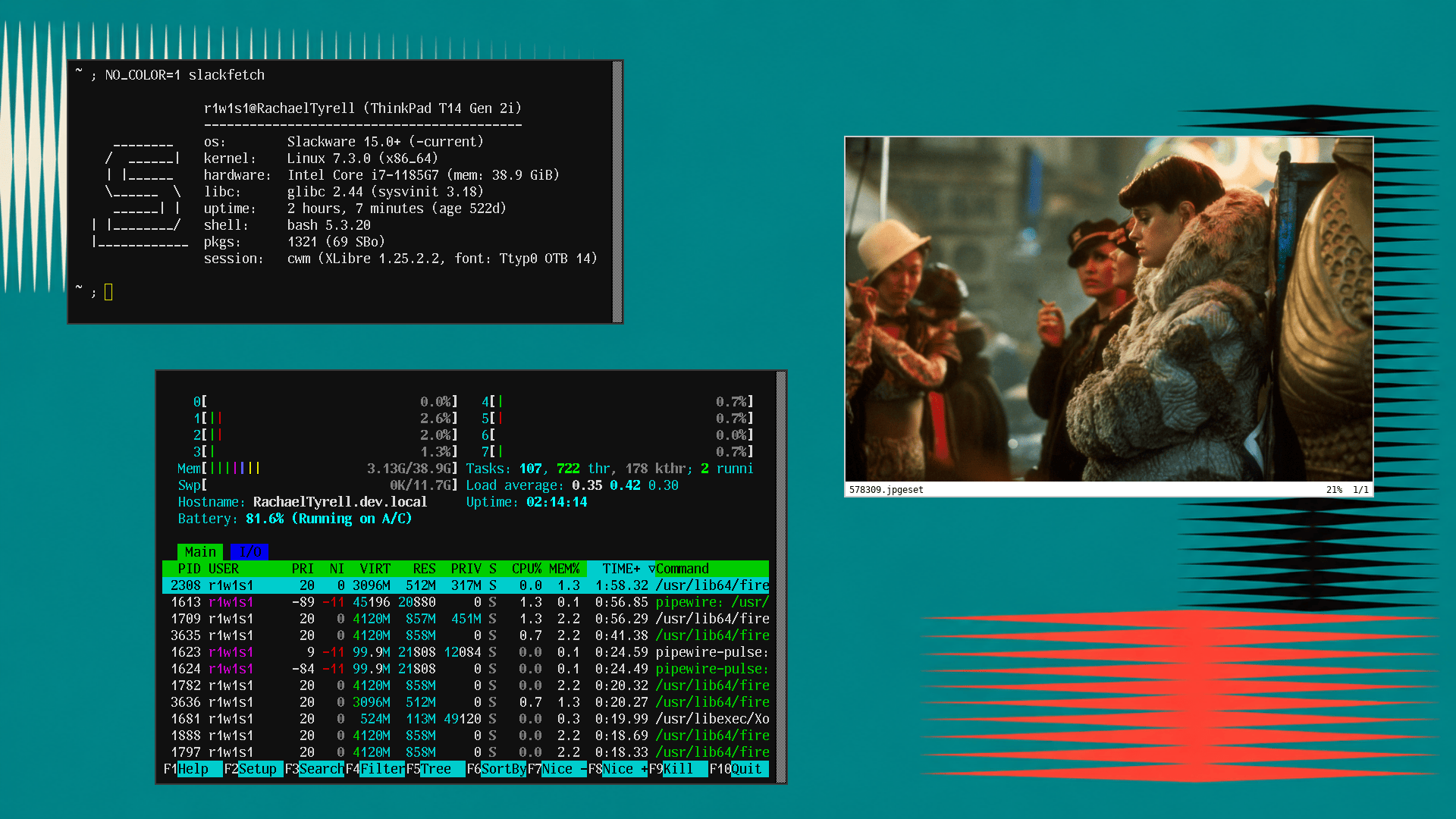
|
|||
|
|||
|
cwm looks nice, I should try it. Can I have a battery percentage monitor there?
My travel typewriter has been migrated to NetBSD a while ago, and I'm not entirely happy with ctwm... |
|||
|
|||
(19-10-2026, 09:48 PM)r1w1s1 Wrote: Switching from dwm to cwm made my setup even simpler. (Slackware -current) What CWM source did you use? The one from the OpenBSD CVS repo? Or one of the forks/mirrors on Github? |
|||